Back to Portfolio
View in Figma
Case Study · Dashboard UI

ShopX Admin Dashboard

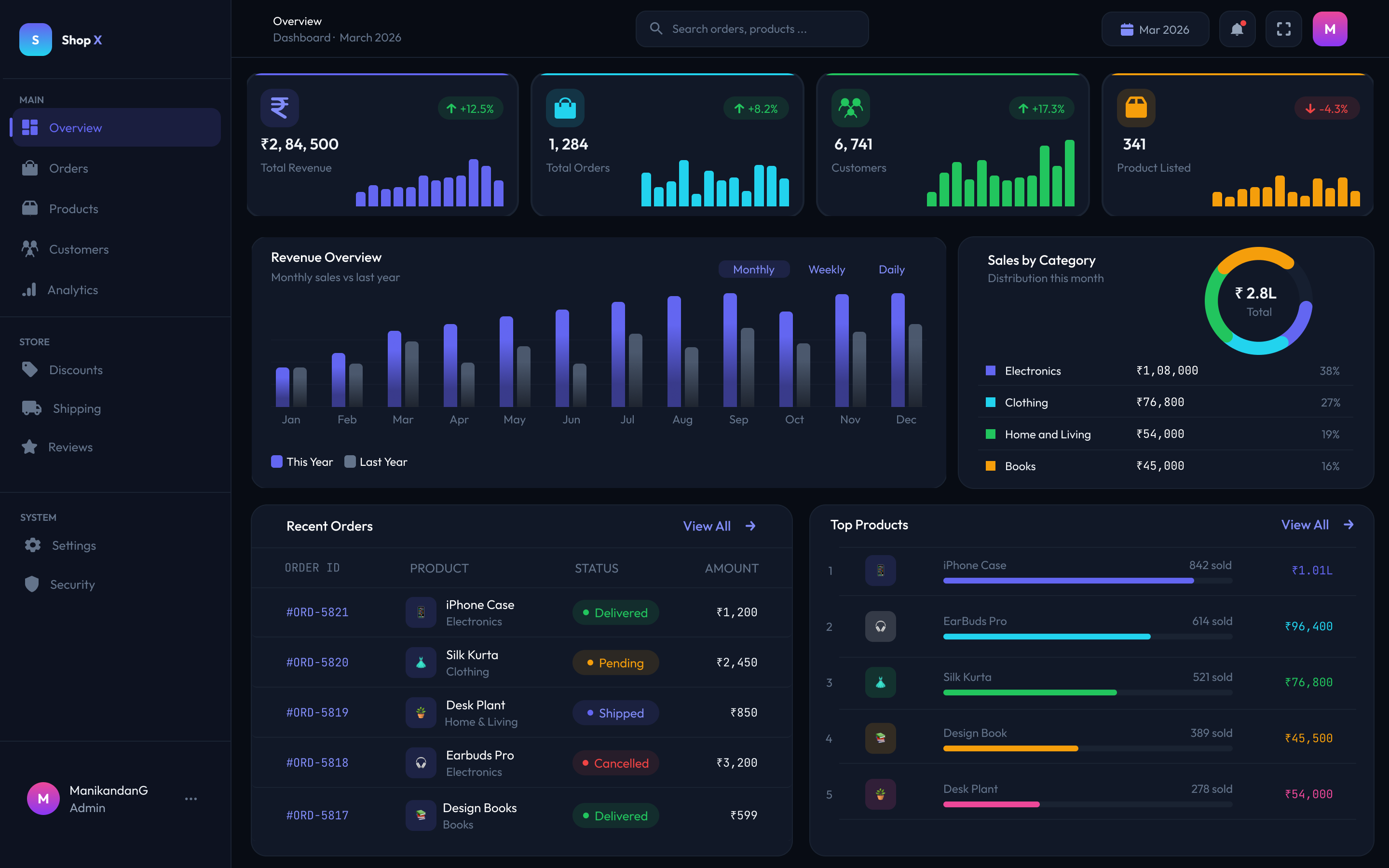
A full e-commerce admin dashboard designed in Figma — featuring KPI stat cards, revenue charts, sales breakdown, recent orders table, and a top products panel. Built with reusable components and auto layout.

Figma Desktop UI Data Visualization E-Commerce Components
4 KPI Cards

Revenue, Orders, Customers, Products

2 Charts

Bar chart + Donut chart

Orders Table

With status badges + amounts

Top Products

Ranked list with progress bars

Auto Layout

Fully structured components

Problem & Solution

⚠️The Problem

E-commerce store owners need to monitor multiple business metrics at once — revenue trends, order status, top-selling products, and category performance. Most dashboards are either too cluttered or too minimal, making key data hard to find quickly.

The Solution

  • Clear hierarchy — most important KPIs at the top as scannable stat cards
  • Visual data — bar chart for revenue trends, donut for category split
  • Actionable tables — recent orders with color-coded status badges
  • Dark theme — reduces eye strain for long sessions

Dashboard Overview Screen

ShopX Admin Dashboard Overview

Component Breakdown

Sidebar Navigation

Grouped into Main, Store, and System sections. Active state highlighted with accent color. User profile pinned at bottom.

KPI Stat Cards

4 cards — Total Revenue ₹2,84,500 · Orders 1,284 · Customers 6,741 · Products 341. Each shows % change with mini sparkline chart.

Revenue Bar Chart

Monthly vs last year comparison with Monthly / Weekly / Daily toggle. This year in purple, last year in grey.

Sales Donut Chart

Category breakdown — Electronics 38%, Clothing 27%, Home & Living 19%, Books 16%. ₹2.8L total shown in center.

Recent Orders Table

Order ID · Product · Status badge · Amount. Status uses color-coded chips: Delivered (green), Pending (yellow), Shipped (blue), Cancelled (red).

Top Products Panel

Top 5 products ranked by sales with colored progress bars and revenue amounts. iPhone Case leads at 842 sold / ₹1.01L.

Design Decisions

🎨

Dark Theme Choice

Dark navy background reduces eye strain for admins who spend long hours monitoring data. High contrast text ensures readability at a glance.

📊

Color-Coded Data

Each KPI card uses a different accent color (blue, cyan, green, yellow) to make each metric instantly distinguishable without reading the label.

🔢

Status Badges

Order status uses 4 distinct colored badges — green, yellow, blue, red — so an admin can scan order health in seconds without reading every row.

📐

Auto Layout & Components

All cards, table rows, and nav items built with Auto Layout and reusable components — making the design scalable and consistent throughout.